
TOP BEST ANDROID LANUNCHER
1. Go Launcher
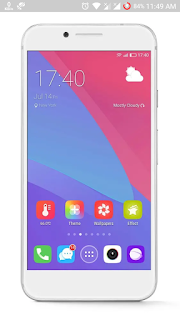 Go Launcher is an application that will change the apperance of the operating system of your Android device, making it much more colourfull, more manageable and intuitive in some of its features.
This launcher will allow you to easily change the 'theme', from this launcher's store called 'Go Store'. Also you will be able
to change the aspect of the different screens like all the icons that may have in different desks.
Go Launcher is an application that is very complete to give air to the dirrerences in your Androiod Terminal. if you also
combine some of the tools of the GO equipment, you will be obtain a truly personal Android terminal.
 2. Nova Launcher
 Nova Launcher is one of the best Android launcher in the world. I personally use Nova Launcher, it is a buttery smooth launcher. It is fast, efficient and lightweight. Icon packs are available in the Play Store to change the look and feel of Android system.
It support dock customizations, notification badges, and option to show the frequently used apps in the top row in the app drawer, folder and icon customizations, dozen of gestures and many other features. It also support for app shortcuts found in Android Nougat. It's prime version unlock some of the most good features of this launcher and it definitely worth a try.
 3. Apex Launcher

Apex launcher is a visually stunning launcher with thousand of themes and icon packs that you can download direct from Play store. It is a lightweight launcher optimized for both smartphones and tablets. You can add up to 9 customizable home screens and hide apps in your app drawer that you don't need. The launcher sorts apps in the app drawer according to the title, installation date or how frequently you use them. Buying a pro version will unlock more gesture options, powerfull app drawer customizations, many more additional features.

4. Microsoft Launcher

Microsoft Launcher also known as a Arrow Launcher. Microsoft Launcher is a fast and elegent Android launcher with a lot of
customization from Microsoft. It can update new wallpapers from Bing every day. One home screen is decored with panels resembling 'Google Cards'. A Recent panel shows recently opened media or recently used contact. There is also an optio to merge duplicate contacts if you have any. This app is available on Google Play Store.

5. ADW Launcher

ADW Launcher is stable, fast, easy to use and offers hundreds of customizable options. The UI almost feels like stock Android.
It supports a unique feature to change interface colour according to your wallpaper. In this launcher feature like icon badges, app indexing on app drawer, launcher shortcuts, transition animations and tons of other useful feature out there.
It developers claim that the possibitiy that you will configure it to your lickness is approximately 3720 to 1. You can make and modify your widgets with your own colors.

1. Go Launcher

This launcher will allow you to easily change the 'theme', from this launcher's store called 'Go Store'. Also you will be able
to change the aspect of the different screens like all the icons that may have in different desks.
Go Launcher is an application that is very complete to give air to the dirrerences in your Androiod Terminal. if you also
combine some of the tools of the GO equipment, you will be obtain a truly personal Android terminal.


It support dock customizations, notification badges, and option to show the frequently used apps in the top row in the app drawer, folder and icon customizations, dozen of gestures and many other features. It also support for app shortcuts found in Android Nougat. It's prime version unlock some of the most good features of this launcher and it definitely worth a try.


Apex launcher is a visually stunning launcher with thousand of themes and icon packs that you can download direct from Play store. It is a lightweight launcher optimized for both smartphones and tablets. You can add up to 9 customizable home screens and hide apps in your app drawer that you don't need. The launcher sorts apps in the app drawer according to the title, installation date or how frequently you use them. Buying a pro version will unlock more gesture options, powerfull app drawer customizations, many more additional features.

4. Microsoft Launcher

Microsoft Launcher also known as a Arrow Launcher. Microsoft Launcher is a fast and elegent Android launcher with a lot of
customization from Microsoft. It can update new wallpapers from Bing every day. One home screen is decored with panels resembling 'Google Cards'. A Recent panel shows recently opened media or recently used contact. There is also an optio to merge duplicate contacts if you have any. This app is available on Google Play Store.

5. ADW Launcher

ADW Launcher is stable, fast, easy to use and offers hundreds of customizable options. The UI almost feels like stock Android.
It supports a unique feature to change interface colour according to your wallpaper. In this launcher feature like icon badges, app indexing on app drawer, launcher shortcuts, transition animations and tons of other useful feature out there.
It developers claim that the possibitiy that you will configure it to your lickness is approximately 3720 to 1. You can make and modify your widgets with your own colors.


