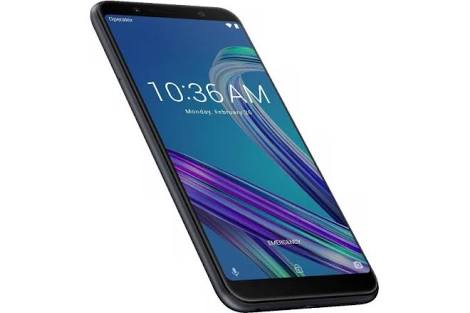
Showing posts with label Asus ZenFone Max Pro M1. Show all posts

Friday, 21 September 2018

How to Enable EIS on the Asus Zenfone Max Pro M1 without root

Now a Days Electronic Image Stabilization has been a topic of interest ever since Google announced Pixel devices with EIS on their Smartphones. The feature got many people talking about it. and company listen their customer feedback too. So, They manufacturers start adopting the technology as soon as possible insteab of 
Optical Image Stabilization. One of the most popular phones in Indian market, the Asus Zenfone Max Pro M1 supports it, too. If you want to enable this feature on your devices then it's not complected but less tricky to activate it.

All creadit goes to XDA Junior Member ronello created a thread explaning how to enable EIS in the stock camers applicaton. it is very easy.

 Touch this photo to go site
1. First of all, you have to open the camera applicaton on your device.

2. Tap on Settings.


3. Look for "Redeye Reductons" and tap on it unitl you get  notificatio saying that you're now in additional settings.

4. Switch to video mode.

5. Set the video resolution to less tha 4K. 1080p works as well.

6. Toggle the "Image Stabilization" option in the settings.


That's it..Looking fairly easy instructions to follow if you want. Some users says after enabling EIS, videos are less shakey. 


Another trick to enable EIS on Asus Zenfone Max Pro M1 you can do install the Google Camera without root. For some reasons Asus left in a hideen fastboot command that's lets you enable the Camera2API without modifying any system files. Asus seems to love leaving in these tweaks for us to find..
Thanks!..

Thursday, 24 May 2018

Fatest way to Unlock Bootloader on Asus ZenFone Max Pro M1

Fatest way to Unlock Bootloader on Asus ZenFone Max Pro M1


The Asus ZenFone Max Pro M1 was launched in India. The phone comes with some best features in this class and the phone compet with the Xiaomi Redmi Note 5 Pro . The phone

is very good specification at this price point. the phone comes with two variants = the first with 3GB RAM and 32GB Storage and second one is 4GB RAM and the 64GB Storage
and the best thing is that the price of 3GB RAM is 10,999 and 4GB RAM is 12,999. So many users are booked this devices on e-commerce sites and many of them already got this
device. So in this article we are Unlock the Bootloader on Asus ZenFone Max Pro M1. Once you unlock the Bootloader of your phone, then you customize your phone by installing
Custom ROMs, twerking and so many customization. you can change your device Software by installing Custom rom  and customize the whole look of your phone.


This article is only for the Asus ZenFone Max Pro M1 users and fastest and safest way to Unlock the Bootloader on the phone. You have install the ADB Drivers and some batch files
to Unlock the devices. The process is very simple and ease for newbie to Unlock the Bootloader. and you can also Relock the Bootloader with this article. This article only for
Unlock Bootloader on Asus ZenFone Max Pro M1 by following setps.


Guide to Unlock Bootloader on Asus ZenFone Max Pro M1

This method will void the warranty of your phone. But don't worry you can claim the warranty by Relocking the Bootloader of Asus ZenFone Max Pro M1.

Also
Read:https://asktohelppeolple.blogspot.in/2018/05/how-to-root-redmi-note-5-note-5-pro-and.html?m=1


Some Files You need to Unlock Bootloader

1. Do take a full backup of your phone. accepting with your contact, videos, music, documents etc.

2. Install the ADB and Fastboot Drivers.

3. Download file to Unlock Bootloader of your Asus ZenFone Max Pro M1.

4. Download file to Relock the bootloader of your phone.

5. your phone contain above 50% battery.


Steps to Unlock the Bootloader of Asus ZenFone Max Pro M1


1. Enable the Developer Option. To do go to your phones Setting- About- Software Information- More- Now tap on the Builod Number 7-8 times until you can see a message ''Developer Option enabled''.

2. Now go to developer option and Enable the OEM Unlock  and USB Debugging.

3. Now install the ADB Drivers on your PC.

4. Now reboot your phone into fastboot mode by pressing volume up + power on button at a same time.

5. Once the phone in the fastboot mode, Connect your phone to PC using USB Cable.

6. Now open the Unlock Bootloader Folder and run the Unlock.cmd file on your PC. Now the Command Prompt will open on your PC this will help you to unlock the bootloader

  of your phone.

7. Yessss .. the bootloader is unlocked on your phone.


Relock the Bootloader on  Asus ZenFone Max Pro M1


If you want to Relock your bootloader then follow above steps, but run the relock the bootloader file we are already downloaded above the Relock Folder to relock the bootloader
of your phone.


As simple As easy i hope this guide was helpful to Unlock the Bootloader on Asus ZenFone Max Pro M1. If you have some questions about this guide plesase comments below and we
will help you.
https://www.technobuzz.net/unlock-bootloader-asus-zenfone-max-pro/&hl=en-IN&tg=355

Thursday, 3 May 2018

The Budget Killer Asus ZenFone Max Pro M1 Review

Asus ZenFone Max Pro M1 Review: The New Mid Range Killer


Taiwan based giant company who introduce there mid range smartphone named Asus ZenFone Max Pro M1
after a week ago, asus india had not great success in budget smartphone market. The budget market
occupied by Xiaomi, Motorola, Lenovo and most recent Nokia. However, all that might change very
soon as Asus has launched their new budget offering, the Asus ZenFone Max Pro M1, and its sound
good like great budget device. However, does the on-paper specs of Asus zenFone Max Pro can survive
the real world usage.So, let's checkt it out.


Specifications


The paper specs help in setting our expection of the phone and it's a great place to start the review.
Also the phone is available in multiple Ram versions as you can see in the below.

Asus ZenFone Max Pro M1 has a screen of 5.99 inch full-HD+ with reselvotion 1080*2160 Pixels whit full-
view IPS display. This phone comes with the 18:9 aspect ratios screen. This phones has metal body comes
with a dual-SIM smartphone 2.5D Curved Glass Panel. The octa-core Qualcomm Snapdragon 636 processor is
used in this smartphone and the Adreno 509 GPU for graphics is integrated. Asus ZenFone Max Pro M1 has
three variants. The first variant comes with 3GB RAM and 32 GB of storage. The Second variant, powerful
variants have 64 GB of storage with 4 GB of RAM. The last variant comes with powerful 6 GB of RAM and 64
GB of Storage. It is dedicated MicroSD card slot upto 2 TB in variants. The smartphone comes with Android
Vanila with 8.1 Oreo.

Asus ZenFone Max Pro M1 has dual cameras at the rear . The primary camera is 13 megapixels. itt is equipped
with F 2.2 Aperture and face detection autofocus. The second sensor is 5 megapixels. This is depth sensor
that will help in acheving the Bokeh effect on your photo. An 8-megapixel sensor with F 2.0 Aperture is given
for selfie lovers. And the most attractive feature of this handset is the battery. 5000 mAh battery will work
on the phone. it has 10 watt charger.

This phone comes with the latest features Face Unlock and the Fingerprint sensor for security. Micro-USB 2.0,
3.5mm Headphone jack, GPS, Wi-Fi Direct and Wi-Fi 802.11 A / B/ G / N connectivity are part of this handset.
The diamissions of this handset are 159*76*8.61 millimeters and weight of this smartphone is 180 grams.


Asus has informed about the Asus ZenFone Max Pro M1 6 GB RAM variants. its inbuild storage will be 64 GB. it will
come with a 16 megapixel + 5 megapixel real camera and a 16 megapixel front selfie camera. it will cost around
Rs 14,999. This variants opposite of Xiaomis Redmi Note 5 Pro.


This is really a tough fight. Both the Redmi Note 5 Pro and Asus ZenFone Max Pro M1 have the same specs and given you
value for money. Then you will decide which phone did you buy


Conclusion:

Asus ZenFone Max Pro M1


Better Unibody Desigen

Stock Android Experiance Oreo 8.1

Upcoming Android Updates

Very Large Battery and Dedicated Micro-
SD Card Slot

Good Price Starting form 10,999

Available In Open Sale